11.24.2006
Finally i am switching to paid domain
A couple of months ago when i started this blog i dont have any plan to a buy paid domain for my blog but as i feel my readers, friends and some anonymous user like this blog so i move it from www.pankajkala.blogspot.com to www.pankajkala.com. I am adding two new section in this site.Personal development and Health i.e yoga and spirtuality. As i think whether you a geek/student/IT professional or have your own IT or any other business without personal development and health you cant grow more as if you with these 2 things you fill find change in yourself and your carrer.These two things affect you both personally and professionally.So just wait for these two section i hope you like it.
Thanx for all your support and suggestions.
11.22.2006
Run Linux and get money back on your new PC
 UK freelancer Dave Mitchell bought a new Dell laptop, replaced its copy of Windows with Linux - and got money back from Dell for never using the Microsoft OS.
When he started [the computer] for the first time, he clicked the box that said "no" on the Windows licence agreement that asked him to agree to its terms. The text of this agreement states users can get a refund for the "unused products" on their new computer if they get in touch with the machine's manufacturer.
He photo-documented the whole process, and wrote Dell a letter asking for his refund for the unused copy of Windows. Without argument or asking for the photos or the Windows install disc back, Dell sent Mitchell a refund for £55.23 (over 100 bucks). Mitchell said he was "pretty gob-smacked" it was so easy.
UK freelancer Dave Mitchell bought a new Dell laptop, replaced its copy of Windows with Linux - and got money back from Dell for never using the Microsoft OS.
When he started [the computer] for the first time, he clicked the box that said "no" on the Windows licence agreement that asked him to agree to its terms. The text of this agreement states users can get a refund for the "unused products" on their new computer if they get in touch with the machine's manufacturer.
He photo-documented the whole process, and wrote Dell a letter asking for his refund for the unused copy of Windows. Without argument or asking for the photos or the Windows install disc back, Dell sent Mitchell a refund for £55.23 (over 100 bucks). Mitchell said he was "pretty gob-smacked" it was so easy.
Flash Drive Problems
Flash drives are ingenious little devices. Most people are catching on to the incredible ease of use of flash drives. Heck, I have one that boots up to my favorite linux security distribution. This allows me to run an entire operating system via USB. So, even if you had Windows on your computer, I could bypass that and boot to linux - if your computer had USB booting capability. But i digress. Flash memory is great until it bombs out on you. You may get messages saying that your drive isn’t recognized or it may do nothing. What are you to do?
 Flash drives use the FAT file system. This makes it very readable across many different operating systems. Sometimes that file system just gets whacked out. When this happens, you errors about the medium being unreadable. Sometimes, the master boot sector of your flash drive can get hosed. This will give you messages about the drive being unformatted or it won’t read the drive. You plug in your flash drive and your computer may not detect it as a drive. Some of the tools already on this blog will help you recover data off of your flash drive. If it’s a flash card from a camera, you could try this free photo recovery software.
Flash drives use the FAT file system. This makes it very readable across many different operating systems. Sometimes that file system just gets whacked out. When this happens, you errors about the medium being unreadable. Sometimes, the master boot sector of your flash drive can get hosed. This will give you messages about the drive being unformatted or it won’t read the drive. You plug in your flash drive and your computer may not detect it as a drive. Some of the tools already on this blog will help you recover data off of your flash drive. If it’s a flash card from a camera, you could try this free photo recovery software.
6 Tools to Help You Recover Data
I don’t think I have to say that data loss is everyone’s nightmare. At home, data loss could mean years worth of photos, videos, financials, and documents lost. In business, data loss means money out the window. Many times, however, you want to recover data, but you don’t want to pay the exorbitant fees that data recovery companies charge ($150-$250/hour). Let me introduce you to some free data recovery tools.
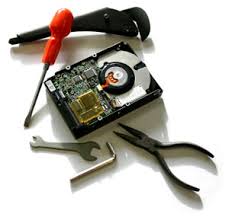 1. NTFS Reader - NTFS reader is a great little program that comes in a boot disk image. This allows you to boot from a floppy disk, read an NTFS partition, and copy the files to the floppy. This is probably the fastest way to get your files off of a non-booting NTFS partition.
1. NTFS Reader - NTFS reader is a great little program that comes in a boot disk image. This allows you to boot from a floppy disk, read an NTFS partition, and copy the files to the floppy. This is probably the fastest way to get your files off of a non-booting NTFS partition. 2. Restoration - Restoration is a utility that allows you to recover items that were deleted out of your recycle bin. It is a very successful tool.
3. Boot Sector Recovery - Sometimes it’s just a matter of getting that boot sector back on track. This little utility simply does the job.
4. DIY DataRecovery - They have a great little repository of free utilities waiting for your perusal. DiskPatch is a great set of tools for repairing partitions, boot sectors and the like. iRecover helps recover lost data. Go check it out.
5. HDCopy - HDCopy allows you to make an exact copy of your drive. You can even push it over to another drive. Ever been stuck with too little space and you wanted to put all your stuff onto a new, huge drive? Wink, wink, nudge, nudge.
6. Recoverdm - Recoverdm allows you to recover disks with bad sectors. Now, having said that, it’s not for the faint of heart. You should be well versed to use this utility.
Remember, once data loss occurs, use that drive as little as possible. This keeps the sectors from being overwritten. Also, you don’t want to be turning the computer on or off, if possible. This will greatly increase your chances for recovering your valuable data.
You’re probably reading this because you have the time to do it yourself or you don’t have the money to purchase commercial data recovery software or services. Just remember, if this is your business and you have really critical data on your drive, it may be time to dig into your wallet. This is especially true if time is of the essence. Also, if your configuration involves RAID or complicated implementations, this also may be time to dish out the money.
11.21.2006
Windows Live Hotspot Locator
 Windows Live Hotspot Locator of course locates hotspots. You just put in your country, state, city, and zip code. You also put the distance and the access fee either free, paid, or both. It works very nicely and you can view the results on a map as well.
11.17.2006
5.5 Gen. iPod and iTunes 7
 Today at Apple's It's Showtime event, Apple revealed quite a bit of new stuff. To start off I'll talk a little about the 5.5 gen. iPod. The new iPod looks basically the same but it has a 60% brighter screen. The iPod also has longer battery life and new headphones. It will have gapless playback (which I think goes for all iPods as an update) and even text based search I'm really not to sure how this function works yet.
iTunes 7 is now available and you can download full length movies such as Pirates of the
Today at Apple's It's Showtime event, Apple revealed quite a bit of new stuff. To start off I'll talk a little about the 5.5 gen. iPod. The new iPod looks basically the same but it has a 60% brighter screen. The iPod also has longer battery life and new headphones. It will have gapless playback (which I think goes for all iPods as an update) and even text based search I'm really not to sure how this function works yet.
iTunes 7 is now available and you can download full length movies such as Pirates of the Caribbean, The Incredibles, Flightplan, and many more. And get this, on the 5.5 gen. iPod you
can now download games at $4.99 each such as Pac-man, Tetris, Bejeweled, and more. There are many other new things in iTunes 7 so got to the iTunes 7 overview page for more info.
Caribbean, The Incredibles, Flightplan, and many more. And get this, on the 5.5 gen. iPod you
can now download games at $4.99 each such as Pac-man, Tetris, Bejeweled, and more. There are many other new things in iTunes 7 so got to the iTunes 7 overview page for more info.
DiscountClick Online Marketing Services
 DiscountClick is a service that helps you market your website. DiscountClick also helps you with SEO (search engine optimization) including placement in Google, Yahoo!, MSN, AOL, Netscape, Ask, and Altavista. They help you with text link advertising as well. DiscountClick has marketing charts, graphs, and keyword ranking results that find where you currently stand in all the major search engines. DiscountClick includes a Keyword Density Analyzer, Traffic Metrics, both Organic and Pay Per Click Traffic and Rank Reporting Utilities. Analyze URLs and perform effective on page SEO optimization for your website or your customers sites. They say they guarantee your satisfaction. DiscountClick charges as low as $50 a month for search engine promotion which wouldn't be too bad if you used it for a couple of months. So you might want to check this out if you'd like to get some hits to your site and get some good rankings in the top search engines.
11.16.2006
Ask Ms. Dewey

Tired of searching via Google and getting almost instant results? sick of getting info as speed as lightning? Got some time to waste around…than this is the perfect search engine for you:
It’s annoyingly slow and made completely from Flash, you may get ecited initially with the humor and most probably with Ms. Dewey herself, but other than that it’s all pointless.
Who is the real Miss Dewey?
In real life Miss Dewey is Janina Gavankar a classically trained pianist, vocalist, and orchestral percussionist.
11.15.2006
Gickr: Create animated Gifs
 Gickr is a service that allows you to create animated Gifs online. There are a couple ways that you can do it though. You can either search Flickr for pictures, use your Flickr account, or you can just upload images to Gickr and create your animated Gif. You can also choose from different sizes and speeds for your Gif. It's really easy to use and it's fun so try it out.
Technorati Profile
Gickr is a service that allows you to create animated Gifs online. There are a couple ways that you can do it though. You can either search Flickr for pictures, use your Flickr account, or you can just upload images to Gickr and create your animated Gif. You can also choose from different sizes and speeds for your Gif. It's really easy to use and it's fun so try it out.
Technorati Profile


Link Alert the Firefox Extension
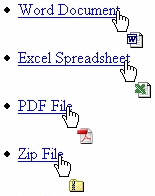 Link Alert is a Firefox extension that puts a small little icon next to the cursor when you hover over a link. The little icon next to the cursor identifies what you're about to click on like a Word document or Zip file. It works for many different types of links including the following: new windows, secure sites, email links, javascript, word documents, excel spreadsheets, PDF files, Zip files, applications, text files, images, and RSS feeds. This comes in very handy and useful. Have fun!
Vista Soft Drink
 Microsoft handed out these free Lemon-Lime Talking Rain sparkling water drinks to employees. The can has a Windows Vista logo on it and a web address for them to learn more about Vista. It seems that they're trying to build hype within the company also.
List of best free and open-source software
 I just thought I would share this great resource for the best free and open-source software for Windows and Mac. Both the Windows and Mac lists have many categories such as web browsing, IM, email, RSS readers and much more! Here is a quote from the site " Free and op en-source software is good for you and for the world. This is the best software that we know of. No adware, no spyware, just good software." Go to the site at Open Source Windows and Open Source Mac.

11.09.2006

11.07.2006
Lose Weight Fast With an HP Digital Camera
HP have launched a new range of Photosmart Digital Cameras that have a slimming feature so that you can make your subjects look lean at the press of a button.
Here's a quick, easy and safe way to lose weight and look fit instantly. And you don't have to stop the calorie intake, just buy an HP Digital Camera.
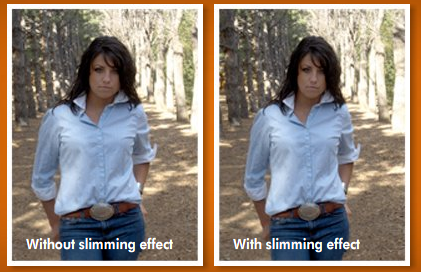 Like the Weight Loss clinic ads in newspapers, the camera's LCD screen will also show a before and after version of the picture before apply the effect permanently. The slimming level can be adjusted using the arrow keys.
And not just slimming subjects - this camera can also be used for the reverse job - thin people can look healthier, atleast in photographs.
Like the Weight Loss clinic ads in newspapers, the camera's LCD screen will also show a before and after version of the picture before apply the effect permanently. The slimming level can be adjusted using the arrow keys.
And not just slimming subjects - this camera can also be used for the reverse job - thin people can look healthier, atleast in photographs.


Like the Weight Loss clinic ads in newspapers, the camera's LCD screen will also show a before and after version of the picture before apply the effect permanently. The slimming level can be adjusted using the arrow keys.
And not just slimming subjects - this camera can also be used for the reverse job - thin people can look healthier, atleast in photographs.
Dell Computers preloaded with Google Software
 Dell Laptops and Desktop Computers may soon be shipped preloaded with Google Toolbar and Google Desktop Search.
Google is in discussion with Dell that could result in Google paying the computer maker up to $1 billion to have its software factory-installed on new Dell PCs.
Google Toolbar and Google Desktop Search are among the items that could appear on new Dell machines.
Dell UK already bundles Firefox with new Dell computers. Google already has a Personalized Google Dell Start Page.
Computer users often don't switch from the pre-loaded programs after they boot up a new computer, making this a lucrative market.
Source: Google: Factory installed from Dell? | Google may strike big deal with Dell
Dell Laptops and Desktop Computers may soon be shipped preloaded with Google Toolbar and Google Desktop Search.
Google is in discussion with Dell that could result in Google paying the computer maker up to $1 billion to have its software factory-installed on new Dell PCs.
Google Toolbar and Google Desktop Search are among the items that could appear on new Dell machines.
Dell UK already bundles Firefox with new Dell computers. Google already has a Personalized Google Dell Start Page.
Computer users often don't switch from the pre-loaded programs after they boot up a new computer, making this a lucrative market.
Source: Google: Factory installed from Dell? | Google may strike big deal with Dell
Recover Data from Scratched, Defective , or Damaged CD Discs
CD-ROMs maybe the most popular choice for storing data especially among the home consumers but they are certainly not the most reliable backup medium.
Some experts believe that the average life of a CD written with the standard CD burner is anywhere between two and five years while the factory burnt CDs have higher life. The life of CD's may also depend on other factors like the storage environment, surrounding temperature, humidity, multiple rewrites and how often the CD is accessed by you.
CD disc can easily get damaged by finger scratches, dust, incorrect handling or if someone tries to label the CD with a pen on the shiny side.
Whatever be the reasons for disc generation, it should be kept in mind that your CDs won't last forever. To see this for yourself, find an old CD that was bundled with the first Pentinum-I computer you bought in 1995. It might throw some unpleasant suprises.
While the best [though impractical] way to remain safe is to keep testing your collection of CDs at frequent intervals or taking backup of CD's itself on other CDs or external hard-drives, the big question is what can you do if the data contained in an old CD suddenly becomes inaccessible ? You ejected the CD to clean it with a cotton cloth but unfortunately, those precious family photographs on the CD are still unreadable.
Don't lose hope yet. If you are lucky, those important files in the corrupted CD can still be retrieved with some of these free data recovery software:
Unstoppable Copier - Available for Windows and Linux, this free utility can copy files from disks with problems such as bad sectors, scratches or that just give errors when reading data.
Normally when your computer is unable to copy a file from a damaged disk it will abort and delete the portition of the file it has copied. This program however will continue to copy the file right to the end. Any data that is not recoverable after many retries is replaced with blanks.
CD Check - detects and recovers damaged files on CD-ROMs. CDCheck can also be used to check the health of your existing working CDs to ensure that the data residing inside is safe.
IsoBuster - It supports all CD and DVD formats. Isobuster has tons of data recovery features and the basic version is free of cost.
Advice: If you notice a scratch on the surface of a CD or DVD, immediately duplicate that disc before inviting problems in future.
11.06.2006
Top 10 CSS image gallery tutorial
Cosmetic Surgery Delhi
There are many tutorials out there on how to create your own image gallery. There are simple ones made from pure CSS, and there are complex ones using css and javascript. By the end of this article you will have the information necessary to start building your own photo gallery. The first tutorial is from cssplay and is one of my favorites around. They have a very elegant and simple image gallery. Your images are separated into different sections (people, plants, animals, etc) and all your images for each section listed nicely underneath. As you hover over each image it expands double it's size so you can take a better look at each image before you view the full version. The interface is very clean and simple to use, I recommend taking a look at this one. Our next example is from the css library at dynamicdrive . This is a more basic image gallery setup, it just involves thumbnails on the site and you hover over each one the full image is displayed on the right side of the screen. The code for this one is simple and is good for beginners to understand whats happening.


 This next one is a remake of the first gallery on this list and again it's from cssplay. The main design is basically the same with the different tabs on top for the sections. As you hover over images they no longer expand for easier viewing, the background of the images is just changed to black. I really liked the expanding images on hover from the first one I wish they would have kept it in the remake. In this new one when you click an image the full size is loaded right into the window, then if you click it again it will take you right back to the list of images. I really like this feature in the new one, it makes it more user friendly not having to redirect to view the full size image. This one is also worth looking at..


 If you have a custom image gallery, or know of one that I missed worth mentioning leave a comment and let me know.
There are many tutorials out there on how to create your own image gallery. There are simple ones made from pure CSS, and there are complex ones using css and javascript. By the end of this article you will have the information necessary to start building your own photo gallery. The first tutorial is from cssplay and is one of my favorites around. They have a very elegant and simple image gallery. Your images are separated into different sections (people, plants, animals, etc) and all your images for each section listed nicely underneath. As you hover over each image it expands double it's size so you can take a better look at each image before you view the full version. The interface is very clean and simple to use, I recommend taking a look at this one.
Our next example is from the css library at dynamicdrive . This is a more basic image gallery setup, it just involves thumbnails on the site and you hover over each one the full image is displayed on the right side of the screen. The code for this one is simple and is good for beginners to understand whats happening.
This next example is another simple one from dasme.org called ImageGal. This image gallery uses javascript along with CSS, but again is a simple gallery that would be good for beginners looking for something similar to this. To use it you simply click on a thumbnail and the full size image is loaded right onto the screen. Again nothing too complicated but something for you beginners to look at.
Here we have another creative one from cssplay. This one isn't so much an image gallery as it is a mesh of seven different pictures set to interact in a kind of accordion fashion. All the images are stacked on each other horizontally and as you hover over each image it expands from it's current position, I don't see this being useful with a lot of images but it's a creative little one.
Project Seven has one slightly similar to dasme.org but they did theirs right. Your images are displayed vertically along the left side of your screen one on top of another. As you scroll through them and click one, the image along with a description are loaded right there for you. It's minimal but is very well designed.
This next one is a remake of the first gallery on this list and again it's from cssplay. The main design is basically the same with the different tabs on top for the sections. As you hover over images they no longer expand for easier viewing, the background of the images is just changed to black. I really liked the expanding images on hover from the first one I wish they would have kept it in the remake. In this new one when you click an image the full size is loaded right into the window, then if you click it again it will take you right back to the list of images. I really like this feature in the new one, it makes it more user friendly not having to redirect to view the full size image. This one is also worth looking at..
This next one is from joshuaink.com and has a nice clean layout, when you hover over an image you are shown the description for the image, and when you click an image you are redirected to the full size image with the description on top. It's not too complicated so this would be another good one for beginners to look at and mess around with because there's not a lot of extra code to get confused about.
This image gallery from tkjdesign.com is another one that uses javascript in addition to css to display the images. You have a set of images on the left hand side of your screen and as you hover over them you only get a white border, but as you click each image the page background is dimmed, and the full size image is loaded right onto the screen. To get back to the images simply click the image your viewing and it will be closed. This one is a more advanced gallery and also worth looking at.
Our next tutorial is from webreference.com is another simple one which takes some of your images, displays them as thumbnails and as you hover over each one the full size image is displayed with a little description. It's not the nicest layout but again for you beginners this is another good place to start.
Our last tutorial is another from Project Seven and this is one of the more advanced ones. This one has some similarities to cssplay's image gallery but the way in which it loads each image as you click it is unique. It loads the image then re sizes it from 0% to 100% right in front of you, which isn't really complicated for more advanced users but it gives it a nice fun feeling.
If you have a custom image gallery, or know of one that I missed worth mentioning leave a comment and let me know.11.05.2006
The Blogging Scholarship...when this will happen in india?
My friend Paul is one of the 10 finalist for this scholarship.He have been chosen as a top ten finalist for a $5,000 blogging scholarship for college students. The final winner is chosen via an online voteI hope he will win the scholarship and wish him best of luck. I am just waiting for the day when this kind of things happen in India.
200+ extremely useful firefox extensions that save time and effort
Categories : Advertising | Archive/History | Blogging | Bookmarking | Chat | Clips/Notes/Scrapbook | Customizing/Editing Website Display | Discover | Downloading/Files/FTP | Email/Gmail/Webmail | Financial/Stocks | Google | Internet Explorer/Other Browsers | Images/Graphics/Maps/Video | Links | Managing Extensions | Mouse | Music | PDF | Passwords | Performance/Speed/Tuning | Print | Privacy | Productivity | RSS/Feeds/Livemarks | Search | SEO Search Engine Optimization | Security | Tabs | Text (Copy/Cut/Paste/Spell/Translate) | Weather | Web Development
Advertising : I want to ...
- block ads on webpages : Adblock
- block ads on webpages : Adblock Plus
- automatically update adblocker filters : Adblock Filterset.G Updater
- block Flash ads/content : Flashblock
- Back to Top of the Page
- Suggestions/Corrections : Comment in blog : wordpress : I want a Firefox Extension to ...
Archive/History : I want to ...
- create a log of browsing history : Slogger
- see sites visited today/yesterday/2 days ago/etc : History Menu
- see thumbnails of pages in session history : Reveal
- Back to Top of the Page
- Suggestions/Corrections : Comment in blog : wordpress : I want a Firefox Extension to ...
Blogging : I want to ...
- blog about the current page : Performancing for Firefox
- blog to Blogger service : BlogThis
- blog to LiveJournal/etc : Deepest Sender
- comment about the blog page : coComment
- know when blog content is under Creative Commons license : mozCC
- Back to Top of the Page
- Suggestions/Corrections : Comment in blog : wordpress : I want a Firefox Extension to ...
Bookmarking : I want to ...
- add a bookmark-here link in the bookmarks tree : Add Bookmark Here
- bookmark at del.icio.us : Bookmark with Del.icio.us
- bookmark at furl.net : Furl Tools
- bypass/customize the add-bookmark dialog : OpenBook
- edit bookmarks easily : Flat Bookmark Editing
- search the bookmarks : Locate in Bookmark Folders
- store and sync bookmarks online : Chipmark
- store and sync bookmarks online : Foxmarks Bookmark Synchronizer
- sync del.icio.us and Firefox bookmarks : Foxylicious
- sync Firefox bookmarks on different computers : Bookmarks Synchronizer
- Back to Top of the Page
- Suggestions/Corrections : Comment in blog : wordpress : I want a Firefox Extension to ...
Chat : I want to ...
- chat on the Internet Relay Chat (IRC) : ChatZilla
- Back to Top of the Page
- Suggestions/Corrections : Comment in blog : wordpress : I want a Firefox Extension to ...
Clips/Notes/Scrapbook : I want to ...
- save a webpage : ScrapBook
- save clips from web pages : Clipmarks
- write a note about a webpage : QuickNote
- Back to Top of the Page
- Suggestions/Corrections : Comment in blog : wordpress : I want a Firefox Extension to ...
Customizing/Editing Website Display : I want to ...
- add/remove/change some features for sites : Aardvark
- add/remove/change some features for sites : GreaseMonkey
- customize a page and save as GreaseMonkey script : platypus
- manage user styles for sites : Stylish
- Back to Top of the Page
- Suggestions/Corrections : Comment in blog : wordpress : I want a Firefox Extension to ...
Discover : I want to ...
- discover new sites being recommended by others : StumbleUpon
- see useful sites for pages geographically marked with ICBM/geo.position tags : GeoURL
- Back to Top of the Page
- Suggestions/Corrections : Comment in blog : wordpress : I want a Firefox Extension to ...
Downloading/Files/FTP : I want to ...
- automatically save downloads to different directories : Download Sort
- download all the links on a page (filter by type) : DownThemAll!
- download/upload files using ftp : FireFTP
- manage file downloads : FlashGot
- open the download manager in another tab : Download Manager Tweak
- see download speed in a statusbar : Download Statusbar
- stop opening blank windows for downloads : Disable Targets For Downloads
- Back to Top of the Page
- Suggestions/Corrections : Comment in blog : wordpress : I want a Firefox Extension to ...
Email/Gmail/Webmail : I want to ...
- be notified when new mail arrives at Gmail account : Gmail Notifier
- email the entire webpage : Amazing webpage emailer
- insert custom signature into emails : Signature
- insert smiley icons in messages : Smiley Xtra
- manage multiple Gmail accounts : Gmail Manager
- treat plain text email address as link : text/plain
- use different Gmail accounts in different tabs : CookiePie
- use disposable email addresses : Create disposable email addresses
- use Gmail for space : Gmail Space
- use Yahoo Mail with AJAX support : AJAX Yahoo! Mail
- use webmail when mailto: link is clicked : WebMailCompose
- Back to Top of the Page
- Suggestions/Corrections : Comment in blog : wordpress : I want a Firefox Extension to ...
Financial/Stocks : I want to ...
- see prices in different currencies : ViewMyCurrency
- see stock prices in a ticker : StockTicker
- Back to Top of the Page
- Suggestions/Corrections : Comment in blog : wordpress : I want a Firefox Extension to ...
Google : I want to ...
- add more links to Google search; remove ads : CustomizeGoogle
- display my Adsense earnings : Adsense Notifier
- enhance Google search results with more links : CustomizeGoogle
- search Google and use other Google services : Google Toolbar for Firefox
- view an unavailable page via Google archive : Cacheout!
- Back to Top of the Page
- Suggestions/Corrections : Comment in blog : wordpress : I want a Firefox Extension to ...
Internet Explorer/Other Browsers : I want to ...
- view an Internet-Explorer-only webpage in Firefox : IE Tab
- view the same page in Firefox when it is open in Internet Explorer : FirefoxView
- Back to Top of the Page
- Suggestions/Corrections : Comment in blog : wordpress : I want a Firefox Extension to ...
Images/Graphics/Maps/Video : I want to ...
- click on Google images thumbnail to get full image : Google Images Re-Linker
- map an address; get directions : Map+
- save background/un-save-able images on various sites : Backgroundimage Saver
- save all the images/media on a page : Magpie
- show ALT attribute in a popup bubble : Popup ALT Attribute
- zoom in/out on an image : Image Zoom
- save video of a URL in clipboard : Clipboard-Save-As
- Back to Top of the Page
- Suggestions/Corrections : Comment in blog : wordpress : I want a Firefox Extension to ...
Links : I want to ...
- copy the anchor text of a link : Copy Link Name
- copy the anchor text of a link : Copy Link Text(CoLT)
- drag a link or picture and open it in a new tab : SuperDrag&Go
- double click on plain text url to open it : Text Link
- download/open all/selected links on a page : Linky
- number the links and use the keyboard to navigate : numberedlinks
- see small icons to show different link types (secured, pdf etc) : TargetAlert
- select and open multiple links in one action : openselectedlinks
- treat a plain text url as a link : Fetch Text URL
- treat a plain text url as a link : Linkification
- wrap long links that require side scroll : MR Tech Link Wrapper
- Back to Top of the Page
- Suggestions/Corrections : Comment in blog : wordpress : I want a Firefox Extension to ...
Managing Extensions : I want to ...
- backup instaled extensions : Firefox Extension Backup Extension
- edit extensions options from Tools menu : Options Menu
- install and manage extensions locally : MR Tech Local Install
- list installed extensions and themes : InfoLister
- list installed extensions and themes : ListZilla
- restart Firefox with one click : Restart Firefox
- see updates available for extensions : Update Notifier
- sort the extensions list : Slim Extension List
- Back to Top of the Page
- Suggestions/Corrections : Comment in blog : wordpress : I want a Firefox Extension to ...
Mouse : I want to ...
- use mouse gestures (auto/history/tab scrollers etc) : All-in-One Gestures
- Back to Top of the Page
- Suggestions/Corrections : Comment in blog : wordpress : I want a Firefox Extension to ...
Music : I want to ...
- control iTunes using Firefox : FoxyTunes
- launch windows media player for embedded video : MediaPlayerConnectivity
- Back to Top of the Page
- Suggestions/Corrections : Comment in blog : wordpress : I want a Firefox Extension to ...
PDF : I want to ...
- open PDF files in a new tab : PDF Download
- Back to Top of the Page
- Suggestions/Corrections : Comment in blog : wordpress : I want a Firefox Extension to ...
Passwords : I want to ...
- bypass mandatory registration of username and password for sites : BugMeNot
- create new different passwords for different sites : PasswordMaker
- remember my username and passwords on sites : Always Remember Password
- Back to Top of the Page
- Suggestions/Corrections : Comment in blog : wordpress : I want a Firefox Extension to ...
Performance/Speed/Tuning : I want to ...
- edit userChrome.css/userContent.css/user.js : chromEdit
- edit/delete/move the menu items : Menu Editor
- minimize Firefox to system tray : MinimizeToTray
- see page loading progress bar : Fission
- see page loading statistics in a statusbar : Extended Statusbar
- make the stop and reload button act as one button : Stop-or-Reload Button
- speed up Firefox : Fasterfox
- use colorful menu icons : CuteMenus - Crystal SVG
- use colorful menu icons : CuteMenus2
- Back to Top of the Page
- Suggestions/Corrections : Comment in blog : wordpress : I want a Firefox Extension to ...
Print : I want to ...
- remove unwanted text/image block before printing a page : Nuke Anything Enhanced
- Back to Top of the Page
- Suggestions/Corrections : Comment in blog : wordpress : I want a Firefox Extension to ...
Privacy : I want to ...
- add/edit cookies : Add N Edit Cookies
- block phishing sites : NetcraftToolbar
- clear everything after the browsing session : X (Paranoia) Mod 0.6.5
- clear the cache with one click on the toolbar : Clear Cache Button
- see where form information is being submitted : FormFox
- surf the web without leaving a trace in my computer : Stealther
- use multiple proxy sites to surf the web : SwitchProxy Tool
- use multiple proxy sites to surf the web : xyzproxy
- Back to Top of the Page
- Suggestions/Corrections : Comment in blog : wordpress : I want a Firefox Extension to ...
Productivity : I want to ...
- add a powerful multi-functional preference bar : PrefBar
- add bookmarks to history to make auto-complete URL : AutoMarks
- add more search engines to Firefox search box : Mycroft
- automatically reload a page every few seconds : Reload Every
- automatically show/close the sidebar with mouse motion : Optimoz Tweaks
- create a tiny url : TinyUrl Creator
- disable the install default countdown delay : MR Tech Disable XPI Install Delay
- drag a link to a text area : DragToScroll
- enhance search engine results with more information : BetterSearch
- navigate up one folder level on a site : Uppity
- open links/mailto with external applications : Launchy
- remove content from pages permanently : Remove It Permanently
- restore all open pages after a crash : Crash Recovery
- restore the browser exactly as closed last time : SessionSaver
- see all open tabs together on screen : Firefox Showcase
- see date and day in the status bar : Statusbar Clock
- see more search result/image entries on pages : repagination
- smoothly scroll up/down the page : SmoothWheel
- switch between multiple sidebard : All-In-One Sidebar
- track time spent browsing / on a project : TimeTracker
- use a calendar : Mozilla Calendar
- use a sidebar to control multiple functions : All-in-One Sidebar
- use keyboard to go to next page/previous page : NextPlease!
- use the keyboard for more functions : mozless
- Back to Top of the Page
- Suggestions/Corrections : Comment in blog : wordpress : I want a Firefox Extension to ...
RSS/Feeds/Livemarks : I want to ...
- Add RSS feeds to web-based/desktop readers or reader extensions : LiveLines
- read RSS feeds : Sage
- read RSS feeds : Wizz RSS News Reader
- reload all LiveMarks : Reliby
- scroll LiveMarks feeds in a tickler : RSS Ticker
- see newsfeeds/blogs raw xml with styles : Feedview
- Back to Top of the Page
- Suggestions/Corrections : Comment in blog : wordpress : I want a Firefox Extension to ...
Search : I want to ...
- add search engines to context menu : ConQuery
- automatically resize the search box for longer terms : Searchbar Autosizer
- change the order of search engines : Search Engine Ordering
- choose from a list of search engines : Groowe Search Toolbar
- choose from a list of search engines : Hyperwords
- delete a search plugin : SearchPluginHacks
- preview thumbnails of search results in Google/Yahoo/etc : Cooliris Previews
- preview thumbnails of search results in Google/Yahoo/etc : GooglePreview
- search 1-25 custom chosen sites : Roll your Own Search for Firefox
- search via contextmenu thru customized bookmark keywords : SmartSearch
- Back to Top of the Page
- Suggestions/Corrections : Comment in blog : wordpress : I want a Firefox Extension to ...
Search Engine Optimization : I want to ...
- see Alexa information, search engine backlinks for a page : SearchStatus
- see Google Pagerank in statusbar : Google Pagerank Status
- see information about the site : About This Site
- see search engine link counts and ranks for the page : SEO Links
- see search engine backlinks, analyze links, keyword density etc : SEOpen
- Back to Top of the Page
- Suggestions/Corrections : Comment in blog : wordpress : I want a Firefox Extension to ...
Security : I want to ...
- allow javascript/java/plugins/etc only on trusted sites : NoScript
- control more javascript options : JavaScript Options
- see cookie information on page dialog : View Cookies
- manage cookies : CookieCuller
- Back to Top of the Page
- Suggestions/Corrections : Comment in blog : wordpress : I want a Firefox Extension to ...
Tabs : I want to ...
- add a close button on each tab : Tab X
- change colors for different tabs : Colorful Tabs
- duplicate a tab : Duplicate Tab
- manage tabs (add/move/etc) : Tabbrowser Preferences
- manage tabs (multiple links/duplicate/close same domain/etc ) : Tab Mix Plus
- marks some tabs as permanent : PermaTabs
- move to next/previous tab via keyboard : SwiftTabs
- toggle the tab bar via chosen key : HideTabBar
- use multiple tab rows : superT
- undo/reopen the tab I just closed : Undoclosetab
- Back to Top of the Page
- Suggestions/Corrections : Comment in blog : wordpress : I want a Firefox Extension to ...
Text (Copy/Cut/Paste/Spell/Translate) : I want to ...
- automatically copy the selected text to clipboard : AutoCopy
- copy plain text (without formatting/html) : Copy Plain Text
- fill web forms with name/address/email etc : Autofill
- fill web forms with name/address/email etc : InFormEnter
- find the meaning of selected word in a dictionary : DictionarySearch
- find the meaning of selected word in a dictionary : Dictionary Tooltip
- find the meaning of selected word from Google definitions : Inline Google Definitions
- find the selected word with search plugins : Context Search
- highlight a paragraph and navigate with keys : Paragrasp
- highlight every instance of a word/phrase on the page : Context Highlight
- increase/decrease/back-to-normal text size of the page : Text size toolbar
- paste a url and load the page in one step : Paste and Go
- resize text areas in forums : Resizeable Textarea
- see all tabs in one window : Viamatic foXpose
- spell check text in form fields : SpellBound
- translate selected text using google translation service : gTranslate
- write in WYSIWYG mode in a text area : Xinha Here!
- Back to Top of the Page
- Suggestions/Corrections : Comment in blog : wordpress : I want a Firefox Extension to ...
Weather : I want to ...
- see weather information : ForecastFox
- see weather information (+ radar images) : Forecastfox Enhanced
- Back to Top of the Page
- Suggestions/Corrections : Comment in blog : wordpress : I want a Firefox Extension to ...
Web Development : I want to ...
- change user agent for certain sites : User Agent Switcher
- find the color code of a given pixel : ColorZilla
- capture screenshots : ScreenGrab!
- capture screenshots : Pearl Crescent Page Saver
- check the validity of links on a page : LinkChecker
- copy and format selected text/title/url : Copy URL+
- debug ajax/css/html/javascript : FireBug
- debug javascript : JavaScript Debugger
- download an entire website : SpiderZilla
- edit CSS stylesheet : EditCSS
- find whois information of the site : domainFinder
- inspect the DOM of HTML, XUL, and XML pages : DOM Inspector
- inspect the selected element with DOM Inspector : InspectThis
- measure pixel width with a ruler : MeasureIt
- modify http/https headers and post parameters : Tamper Data
- preview the Adsense ads that might be shown on a page : Adsense Preview
- run automated tests on a site : TestGen4Web
- see anchors on the page : Show Anchors
- see color contrast page information : Colour Contrast Analyser
- see cookie information for a page : View Cookies
- see current page's heading structure in a sidebar : Document Map
- see errors categorizxed by type : Console2
- see GET and POST parmeters of the page : UrlParams
- see how a page will look on mobile screen : Small Screen Rendering XPI
- see http headers of a page : Header Monitor
- see IP address of the site : ShowIP
- see web development references in a sidebar : DevBoi
- see Xpath information : XPather
- simulate WAP browsing by viewing WML : wmlbrowser
- test nightly versions of Firefox : Nightly Tester Tools
- validate html : HTML Validator
- view css styles; view html in another app; validate css/htmlWeb Developer
- view page html source constructs directly on the page : X-Ray
- view rendered source : View Source Chart
- view source with an externall app : ViewSourceWith
- write lorem ipsum content for test page : LoremIpsum Content Generator
- Back to Top of the Page
- Suggestions/Corrections : Comment in blog : wordpress : I want a Firefox Extension to ...